






























































































What Is Donkey Kong? (Overview)
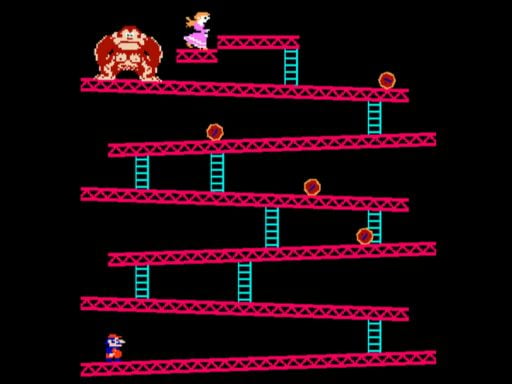
Donkey Kong is a foundational arcade platformer created by Nintendo. You control Jumpman on a construction site, climbing toward Pauline while Donkey Kong rolls hazards—most famously barrels—down the girders. Each stage challenges timing, positioning, and risk–reward decisions (when to score points vs. when to rush the ladder).
- Genre: Arcade / Platformer
- Objective: Reach the top and rescue Pauline
- Core Actions: Run, climb, jump, and use the hammer power-up
- Scoring: Time bonuses, item pickups, and hazard jumps
Release Date & Version History
Arcade debut: mid-1981. The game quickly spread worldwide and later appeared on home systems such as the NES, Atari 2600/7800, ColecoVision, and home computers of the era. Numerous re-releases and emulated editions have preserved the original gameplay across decades.
Fun fact: Jumpman’s popularity here paved the way for the character soon to be called “Mario.”
How to Play & Win (Step-by-Step)
- Plan your route: Identify safe ladders and platforms, and watch barrel patterns.
- Control the pace: Lure barrels away from key ladders before climbing.
- Use the hammer wisely: It grants temporary offense but removes your ability to jump—don’t trap yourself.
- Collect items: Pauline’s hat/purse/umbrella and other items increase score.
- Secure the top: Time your final ladder climb when hazards cycle away from you.
Controls / Key Bindings
Original arcade cabinets used a 4-way joystick plus a single jump button. In browser versions of free Donkey Kong, emulators typically map these to keyboard keys (your specific mapping may vary):
Common Keyboard Mapping
- ← / → : Move left / right
- ↑ / ↓ : Climb up / down ladders
- Space or X : Jump
- Ctrl or Z : Use hammer (while active)
- Enter : Start / pause (if supported)
- 1 / 2 : 1-player / 2-player (if supported)
Arcade Feel Pro Tips
- Use short, deliberate taps to align at ladder bases.
- Face the direction you intend to jump before pressing the jump key.
- When carrying a hammer, position on a slight slope to extend hit coverage.
Note: Key bindings differ by emulator. Check the on-screen legend or settings on this site if your keys don’t match.
Stages & Level Order
Donkey Kong’s early levels cycle through distinct layouts, each with its own hazards and scoring opportunities:
- Barrel Stage (25m): The iconic slanted girders and rolling barrels. Watch for rogue “wild” barrels that drop ladders unexpectedly.
- Pie/Conveyor Stage (50m): Moving belts and fireballs force careful timing between platforms.
- Elevator Stage (75m): Vertical movement and springs add aerial timing challenges.
- Rivet/Final Stage (100m): Remove rivets to collapse the structure and topple Donkey Kong.
As levels advance, enemies speed up and timing windows narrow—precise movement becomes crucial for consistent high scores.
High-Score & Survival Tips
Essential Scoring
- Jump over barrels and fireballs for bonus points; chain safe jumps where possible.
- Grab items (hat, purse, umbrella) en route but never at the cost of a death.
- Milk the hammer sparingly—breaking barrels/fireballs adds up fast.
Survival & Patterns
- Ladder “fake-outs”: step near a ladder to influence barrel paths, then move.
- On elevators, learn the spring rhythm before committing to the final climb.
- On rivet stages, clear a safe side first so you’re not pinched by fireballs.
Frequently Asked Questions
Is this really the classic Donkey Kong?
It’s the classic arcade gameplay you remember—playable in modern browsers via emulation.
When did Donkey Kong come out?
The original arcade release was in 1981, a landmark year that introduced Jumpman (Mario) and Pauline to players worldwide.
Is “free Donkey Kong” safe to play?
Yes—no installs are required here. Use a modern browser, keep only one DK tab open, and disable aggressive ad-blockers if input seems delayed.
Can I use a gamepad?
Many browsers support gamepads. Plug one in before loading the game, then map D-pad/left stick to movement and a face button to jump.
Any accessibility tips?
Try windowed mode at a comfortable size, reduce visual distractions, and remap keys if the emulator allows (e.g., place jump on a larger key).
Browser, Performance & Save Tips
- Close heavy background tabs to reduce input lag.
- If audio crackles, toggle the emulator’s sync option or reduce sample rate.
- Some emulators support local save states; use them to practice tough sections.
- Mobile works in a pinch, but desktop with a keyboard or gamepad offers the best control.
Start Playing Free Donkey Kong
This page is an educational, historical overview of a genre-defining arcade game and provides information for fans and preservationists.